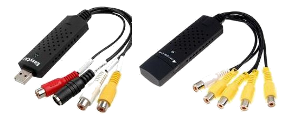
Experiences with the easycap DC60 audio and video capture adapter on Linux

This Blog is dedicated to all owners of the EasyCAP DC60 (or identical) device, who want to use it under Linux.

German speaking users: read my article on ubuntuusers.de

Some feature articles can be found on this site: sites.google.com/site/viewandrecordwithlinux

The EasyCAP DC60 and its clones are cheap little USB analogue capturing devices which can be used for viewing and recording video under Linux from different sources like VHS tape recorders, satellitereceivers, camcorders ...

Friday, April 5, 2013

Stk1160 on ARM devices

Inbetween there are many Linux friendly boards and products out there for usually less than $200.
Here are three lists of Linux friendly boards and mini PCs.
Please report in a comment if anyone uses the STK1160 with success on one of these products.

Ezequiel mentions that *any* Linux board with a USB 2.0 capable host
controller and enough RAM will work fine with STK1160 devices
.
Currently there are some USB related problems on the Raspberry Pi. Read more on this post: However, if the USB has some bandwidth limitation (some USB 3.0 are showing this) then it can have problems with the STK1160. 

The STK1160 was successfully tested on these boards by Ezequiel:
  • ISEE IGEP v2 (Texas Instruments SoC)
  • Plathome Openblocks AX3 (Marvell SoC)
Ezequiel Garcia wrote:
"If any user wants to support STK1160 he can send me hardware.
(Another RPI would be nice :-) Also, I would love to have a non-ARM
non-x86 board, like a MIPS or something like that."
You can contact Ezequiel via github: https://github.com/ezequielgarcia

Friday, March 29, 2013

Features of the stk1160 driver in the kernel

The stk1160 driver in the kernel (3.7 and upward) supports:
  • PAL at 25 fps at 720x576
  • NTFS at 30 fps at 720x480
  • S-Video from input Nr. 4
  • audio capturing (if enabled in the mixer settings)
  • the CVBS + S-Video model and 
  • the four CVBS model (all four channels)
Good to know
  • The Easycap works even if it is connected to an USB 2.0 hub.
  • Some USB 3.0 hosts may have bandwith limitation, then it can have problems with stk1160.
Probably supported but not tested:
  • Two (or more) stk1160 devices working side by side on one system
    (If this is not possible, it's not a driver issue, but rather about USB bandwidth)
Not supported:
  • Famescaling
    Only full PAL or NTFS frames can be captured
    (this is important e.g. for settings in Zoneminder)
Known issues
  • Some  stk1160 based Easycaps don't work on the stk1160 driver but on the legacy easycap driver.
    Read more on this post:
  • Easycap devices currently do not work on the Raspberry Pi
    Read more on this post:

The stk1160 regression problem

Ezequiel Garcia wrote:

"There are a batch of stk1160 Easycaps that don't work on stk1160 but do work
on the legacy easycap driver. This is a known issue since Nov. 2012.

After some remote bug hunting (I don't own any such devices) the problem
seems to be in the decoder chip saa7113, and not in the stk1160.
A couple users offered their devices so I can fix this, but I'm still
waiting for the shipment.

The stk1160 regression on some devices is very important.
If any user wants to contact me to send me one of these broken
devices, I'm still accepting them."

You can contact Ezequiel via github: https://github.com/ezequielgarcia

Saturday, March 23, 2013

Raspberry Pi and Easycap devices

Updated April 13

Here in this recent thread  (page 12 and 13) on the Raspberri Pi forum some promising information about both the legacy easycap driver and the stk1160 driver on the RPI are available.

Sebastian has commented, that the STK1160 Easycap is working on the RPI with the latest Raspbian image (2013-02-09-wheezy-raspbian, kernel 3.6.11+). It has the legacy easycap driver. Read more below, comment nr. 5.


Easycap devices (stk1160, empia, somagic) currently are causing some problems with standard Linux disributions on the Raspberry Pi because of some RPI related USB issues.
However, enhancements are in sight.

The Easycap device registers properly like under any other Linux system (when the driver is in the kernel), but the video data transport through the RPIs USB system doesn't work.
I suppose this issue affects many other v4l2 devices plugged into the RPIs USB.


(There are some posts about success with a modified em28xx driver on the RPI e.g. http://markmail.org/thread/z5r57qadnf77yv2s)

Ezequiel Garcia reported to me the following:

"The problem with the RPI is that it has a crappy USB driver and USB hardware.
When that is solved, stk1160 will work. Probably will take a long time
because synopsis USB datasheet is not public."


Note: The RPI branch on Ezequiels github https://github.com/ezequielgarcia/stk1160-standalone/tree/rpi is broken and doesn't work at all!


Andrew 

Tuesday, October 16, 2012

STK1160 News

Asking for Linux support from Syntek

Ezequiel is asking every EasyCAP stk1160 user to send an email to Syntek
asking them to support Linux drivers and provide a datasheet for their chips.

sales@stk.com.tw

STK1160 driver in kernel 3.7.

The stk1160 driver will replace the easycapdriver in the 3.7.x kernel release.
So, the spring releases of all major distros (Ubuntu 13.04 ...) will have the stk1160 driver onboard. :-)

STK1160 S-video support

Ezequiel is continuously working on the driver and has recently added s-video support.
If you want to use the s-video input you must download the svideo2_for_v3.2 branch from https://github.com/ezequielgarcia/stk1160-standalone/tree/svideo2_for_v3.2 (hit the ZIP button on top left).
Install the driver as described below.

Before you can use the s-video input with the stk1160 driver you need to run (while the STK1160 device is plugged in):
sudo rmmod stk1160
sudo modprobe stk1160 svideo_input=9
Now s-video is available from input number 4.

Monday, July 9, 2012

Summary before summer - Part 2

Summer is here now. Since I planned this post some great things concerning the EasyCAP happened.
A new driver for the EasyCAP DC60 has been published and the program mtvcgui has been updated. (See previous posts).

Some other news I want to mention:
  • Lavc - avconv
    In Ubunt 12.04 there is a new versin of libav (ffmepg branch) which now supports v4l2 capturing again. The ffmpeg and ffplay command in libav are deprecated and soon will be entirely replaced by 'avconv' and 'avplay'.
  • Puppylinux (Racy Puppy) and EasyCAP
    On my other EasyCAP related site I published an article, how Puppylinux can be installed besides of Ubuntu and how the EasyCAP can be used with Puppylinux. 
    https://sites.google.com/site/viewandrecordwithlinux/install-puppy-beside-ubuntu
  • After these evolutions a widely rewrite of some pages of this blog is pending.
  • By the way, I changed my blogname for not to cause some confusion.
Andrew

Sunday, July 8, 2012

New driver for the EasyCAP DC60 - stk1160

Great news!

Some time ago Ezequiel Garcia informed me:
"I just wanted you to know I've re-worked the old easycap driver
from scratch. Now it's called stk1160, because it's the correct name
for such driver. "
Inbetween the driver has been succesfully tested on Ubuntu 12.04 and Bodhilinux 1.4.0 with kernel 3.2. So it should work even on most systems which have the 3.2.0 kernel.

Although some enhancements have to be done, the driver already can be used as a replacement of the easycapdriver. It is expexted that the driver soon will get into the mainline kernel.

The great improvements compared to the easycapdriver are:
- there is no framedropping anymore
- the snd_usb_audio issue is solved
- the driver loads and registers quicker than the easycapdriver

Installation and usage (tested on Ubuntu 12.04)


Note: Although the driver is tested on Ubuntu, you do the installation at your own risk!

Download the driver from here:
https://github.com/ezequielgarcia/stk1160-standalone/zipball/for_v3.2

Unpack the content into your homedir and open a terminal.

At first we blacklist the easycap module (driver), so it cannot conflict with the new driver.

echo "blacklist easycap" | sudo tee -a /etc/modprobe.d/blacklist.conf 
If you want to reuse the easycap module, simply run
sudo modprobe easycap
or delete the entry
blacklist easycap 
in /etc/modprobe.d/blacklist.conf

Enter the unpacked directory with the driversource inside
cd ezequielgarcia-stk1160-standalone-...(the exact name)
and run
make
sudo make install
sudo depmod -a
With the next command you can check if the module has been correctly installed:
modinfo stk1160

After plugging in the EasyCAP test it with mplayer:
mplayer tv://

Configure sound 


The stk1160 module registers a control-only alsa soundcard. This sound card is called 'stk1160-mixer'.
The real sound capture is done through the 'Controlle' soundcard which is also created after plugging in the EasyCAP.
To get a list of the registerd ALSA soundcards, run the following command:
cat /proc/asound/cards
Sample output:
  0 [Intel          ]: HDA-Intel - HDA Intel
                      HDA Intel at 0xf0580000 irq 43
 1 [Controlle      ]: USB-Audio - USB 2.0 Video Capture Controlle
                      Syntek Semiconductor USB 2.0 Video Capture Controlle at usb-0000:00:1d.7-2, hig
 2 [stk1160mixer   ]: stk1160 - stk1160-mixer
                      stk1160 ac97 codec mixer control
To enable sound capture you have to open alsamixer when the EasyCAP is plugged in and select the 'Line' item on the capture menu for stk1160-mixer device:
1. start alsamixer
2. select stk1160-mixer sound card (with F6)
3. select capture controls (with F4)
4. select "Line" output (with space key) 

You can do this on the commandline as well with this line:
amixer -c stk1160mixer sset Line unmute cap 

Note! In the viewing- or capturing program you must then select the 'Controlle' soundcard or its number to hear sound!

Reinstallation oft the driver is required after kernel update!

If you have installed a new kernel on your system (or your update-manager did so automatically)  you need to reinstall the stk1160 driver!


When you do not want to use the stk1160 driver anymore


Simply blacklist the stk1160 module as described above and revert the blacklisting of the easycap module.


Thanks to Ezequiel for his work and support!

Andrew